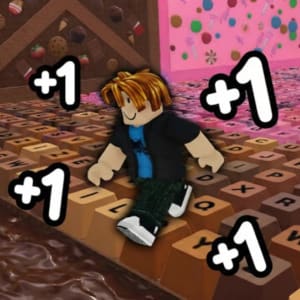
+1 Speed Keyboard Escape
+1 Speed Keyboard Escape is a Roblox-style browser obby where every step makes your character faster. You run over huge keyboard keys, cross candy and chocolate platforms, dodge gaps, and try to keep control as the course gets quicker. This page lets you play +1 Speed Keyboard Escape online and use the guide below when the speed starts turning simple jumps into real timing tests.
This page embeds a third-party HTML5 game so you can play +1 Speed Keyboard Escape online in your browser. Game availability, controls, rewards, ads, and loading behavior may depend on the original distributor.
How To Play +1 Speed Keyboard Escape
The core loop is easy to understand: move forward, build speed, and use that speed to clear longer keyboard gaps. The challenge is that higher speed helps you travel farther, but it also makes tiny aiming mistakes more expensive.
Basic controls:
- Use WASD or the arrow keys to move.
- Press Space to jump.
- Move across the course to increase your speed.
- Collect candy-style rewards when they sit on a safe path.
- Slow your inputs before tight jumps, especially on narrow keys.
The game feels simple at first, but later sections ask for cleaner movement. If you rush every jump at full speed, you may overshoot the platform and restart a section that should have been safe.
Keyboard Obby Features
+1 Speed Keyboard Escape mixes speedrun movement with an obstacle course built around oversized keyboard pieces. It is not a typing test or a shortcut keyboard trainer; the keyboard theme is the map itself.
- Speed growth: every step can push your character faster, turning movement into the main upgrade system.
- Keyboard platforms: giant keys, gaps, and narrow paths create the escape route.
- Candy and chocolate world: bright reward paths and dessert-themed sections give the run its playful look.
- Obby timing: jumps become harder as your speed rises, so stage progress depends on rhythm as much as reaction.
- Fast retries: short failures make it easy to restart, adjust your angle, and try the next run.
That mix makes the game appealing if you like speed keys, parkour rooms, and Roblox-inspired escape courses without opening a separate Roblox client.
Tips For Stage 12 And Hard Sections
Stage 12-style sections can feel rough because your speed may already be high by the time the platforms get tighter. Treat difficult stages like a rhythm course instead of holding forward nonstop.
- Tap movement keys near edges so your character does not slide past the landing.
- Turn the camera before jumping, not while you are already in the air.
- Aim for the center of each key when the path narrows.
- Use shorter jumps when speed is high; full jumps can carry you too far.
- If you miss the same gap repeatedly, reset your approach line before blaming the jump.
The best run usually comes from controlled speed, not maximum speed. A clean path through the keyboard escape room beats a chaotic sprint that falls at the same obstacle again and again.
Codes, Discord, And Scripts
This page is for playing the browser version and learning the route. It does not publish +1 Speed Keyboard Escape codes, code lists, Discord invite links, or candy chocolate scripts. If the embedded game adds official codes in the future, use only in-game menus or verified publisher channels.
Avoid third-party script pages that promise instant speed, candy, or stage skips. They may be unsafe, outdated, or unrelated to this HTML5 version. You can still enjoy the game normally by practicing the course, learning jump lengths, and keeping your movement steady.
Browser Play And Keyboard Notes
+1 Speed Keyboard Escape uses normal browser controls, so it is different from terms such as 1/2 shortcut keyboard, one second keyboard, escape button settings, or the Esc meaning on a keyboard. Pressing Esc may exit fullscreen or release browser focus depending on your device, but it is not a special in-game escape code.
If your keyboard opens browser shortcuts by accident, click inside the game frame again before moving. On some browsers, fullscreen mode can also help the game keep focus while you play.
Why Play This Version
This page keeps the game and guide together. You can start the +1 speed keyboard escape run, learn how speed affects jumps, and then use the related games on this site when you want a different browser challenge.
For more quick-play games, try Vex Try To Fly, Skate Dash, Rocket Ball, and Stick Kombat 2D. For the main strategy game on this site, visit Pokelike.
FAQ
Can I play +1 Speed Keyboard Escape online?
Yes. This page embeds a browser version of +1 Speed Keyboard Escape so you can play online without installing a file from this site.
Are there +1 Speed Keyboard Escape codes for 2026?
This page does not maintain a code list. If codes are added, use the official in-game interface or verified publisher channels instead of random code pages.
Is there a +1 Speed Keyboard Escape Discord?
No official Discord link is provided here. Be careful with unofficial Discord invites that ask for logins, downloads, or script access.
How do I beat Stage 12 in 1 Speed Keyboard Escape?
Slow down your inputs, aim for the middle of each key, and turn the camera before jumping. Most Stage 12 mistakes come from overshooting because your speed is already too high.
Is this the same as a keyboard shortcut or Esc key guide?
No. +1 Speed Keyboard Escape is a keyboard-themed obby game. It is not a guide to keyboard escape characters, shortcut keys, or browser escape-button settings.
Does the game need a candy chocolate script?
No. The browser version is meant to be played normally. Script pages can be unsafe or mismatched with the game version, so the safer option is to practice movement and stage timing.